3D Studio Max
CGRU creates a menu in main window menus panel.
Menu creation script file is cgru\plugins\max\startup.ms.
To setup MAX to launch this script automatically you can add this folder in PATH.
On every start MAX searches PATH for startup.ms scripts and launches them.
Submission Dialog
CGRU -> Afanasy…
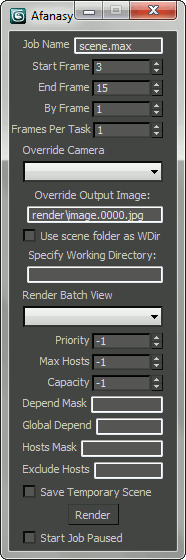
- Job Name
Job name. Scene name by default.
- Start Frame
First frame to render.
- End Frame
Last frame to render.
- By Frame
Render every Nth frame.
- Frames Per Task
Number of frames in one task.
- Override Camera
Select camera to render.
- Override Output Image
Specify output image.
- Use Scene Folder As WDir
Use scene file folder as render process working directory. 3D Studio Max, its plugins sometimes change working directory. With this option it will be always the scene folder.
- Specify Working Directory
Set custom working directory.
- Render Batch View
Select batch view to render.
- Priority
Job order in user job list, ‘-1’ - use default priority.
- Max Hosts
Maximum number of hosts job can capture (running tasks limit), ‘-1’ no limit.
- Capacity
Job tasks capacity, ‘-1’ - use default value.
- Depend Mask
Wait same user jobs names pattern.
- Global Depend
Wait any user jobs names pattern.
- Hosts Mask
Job can run only on hosts which names match this pattern.
- Exclude Hosts
Job can not run on hosts which names match this pattern.
- Save Temporary Scene
Copy scene to temporary file to render. It allows user to continue working with original file.
- Start Job Paused
Send job in offline state.